Lost Device Pentest: What a Lost Laptop Really Reveals
Laptop left on the train? A lost device pentest shows what an attacker reaches with and without credentials and whether BitLocker and hardening hold up.

A notebook gets left on the train, stolen from a car or disappears at the airport. The usual response is that the disk is encrypted anyway. Whether that is enough depends on whether the finder also has the credentials, say a PIN observed on the train, and if not, whether the encryption holds up against an attacker with time and tools.
We check this in a lost device pentest. We receive a device from your standard rollout and play through two scenarios. In the first, the attacker has the device and the credentials and therefore a valid identity. In the second, they only have the hardware, powered off or at the lock screen. In both cases we try to get to data, further credentials or a foothold in the corporate network.
Scenario 1: Lost Device With Credentials
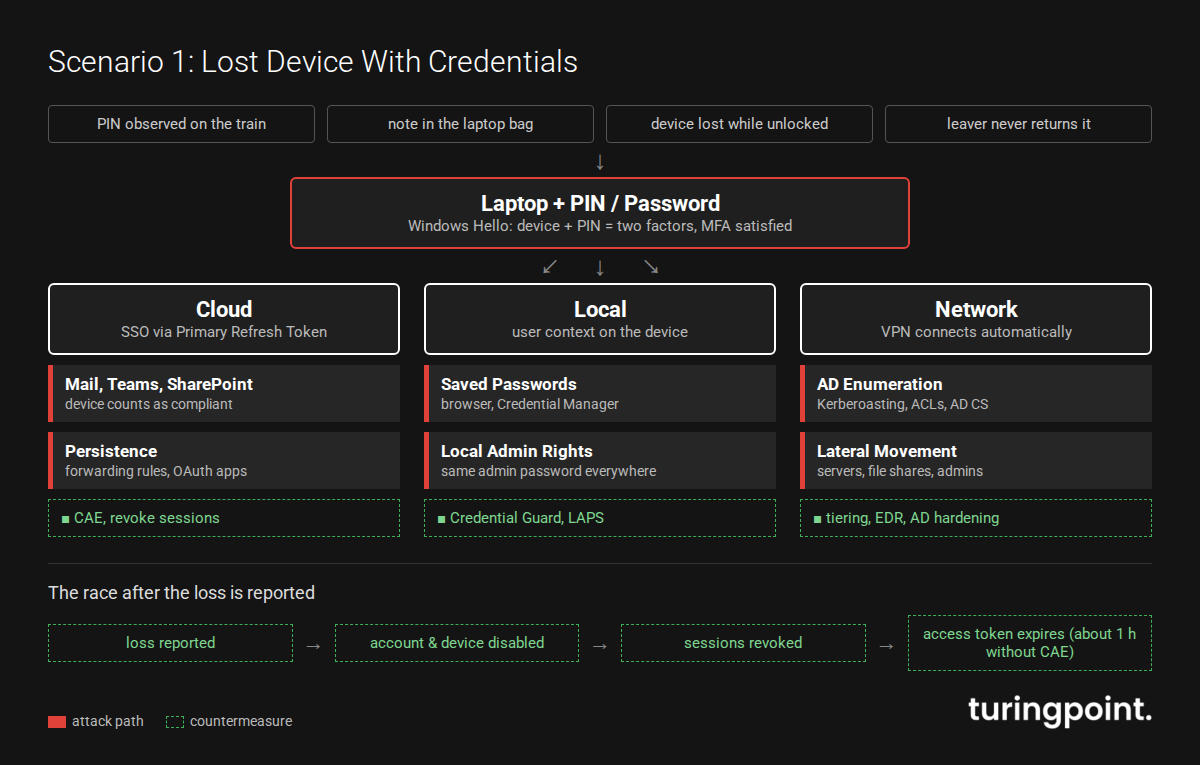
An attacker holding the device and the sign-in details is no edge case. Sometimes the Windows PIN was observed over a shoulder on the train, sometimes the password is on a note in the laptop bag or the notebook was lost while unlocked. And sometimes a leaver simply never returns their device. BitLocker, Secure Boot and DMA protection then don't matter; the attacker just signs in.
And that sign-in is worth a lot. With Windows Hello for Business, the device-bound key plus the PIN counts as two-factor authentication that also satisfies Entra ID MFA requirements. Laptop plus PIN therefore adds up to a complete identity with MFA. The TPM's anti-hammering stops anyone from brute-forcing the PIN, but an observed PIN doesn't need guessing. Token Protection doesn't help either, because it only prevents stolen tokens from being used on other devices, and the attacker is sitting at the original one.
What a Valid Identity Unlocks
In the cloud, single sign-on via the Primary Refresh Token usually logs the attacker into Outlook, Teams, SharePoint and OneDrive without further prompts, and to Conditional Access it is a registered, compliant device. From there, data can be exfiltrated, colleagues can be phished from a trusted mailbox, and backdoors can be planted, such as mailbox forwarding rules or, depending on the tenant's consent policy, OAuth app consents. Such app consents survive a password reset and have to be removed explicitly.
Locally, the user context holds saved browser passwords, Credential Manager entries and access to internal applications. If privilege escalation to local administrator succeeds, hardening decides what happens next. Credential Guard protects NTLM hashes and Kerberos tickets of domain accounts and is on by default from Windows 11 22H2 on eligible Enterprise devices. It does not protect local accounts in the SAM, though. Without Windows LAPS, all devices often share the same local admin password, and a single notebook opens up the whole fleet.
On the network, the VPN connects on its own in many environments. From here the scenario is a classic assumed breach pentest from the perspective of a regular domain user. Typical routes run through AD enumeration, Kerberoasting, flawed ACLs or AD CS weaknesses up to privileged accounts.
The Race Against Revocation
In this scenario, time is what counts. To revoke a user's access in an emergency, you disable the account, revoke sessions and refresh tokens and disable the registered devices. Even then, access tokens already issued remain valid for about an hour by default unless the application supports Continuous Access Evaluation (CAE), and session cookies of individual applications expire according to their own rules. The local Windows sign-in keeps working via cached credentials until the device learns about the block.
An Intune remote wipe only works if the device is online. If it stays offline, the local data remains accessible. In the pentest we therefore also measure how long the identity actually keeps working after the loss is reported.
Scenario 2: Physical Access Without Credentials
In the second scenario the attacker only has the hardware, with no network access and no user account. That removes many protections that feel self-evident in the office. They can reboot the device as often as they like, boot from external media, open the chassis and take weeks. Unlike a classic infrastructure pentest, we therefore also work at the firmware and hardware level.
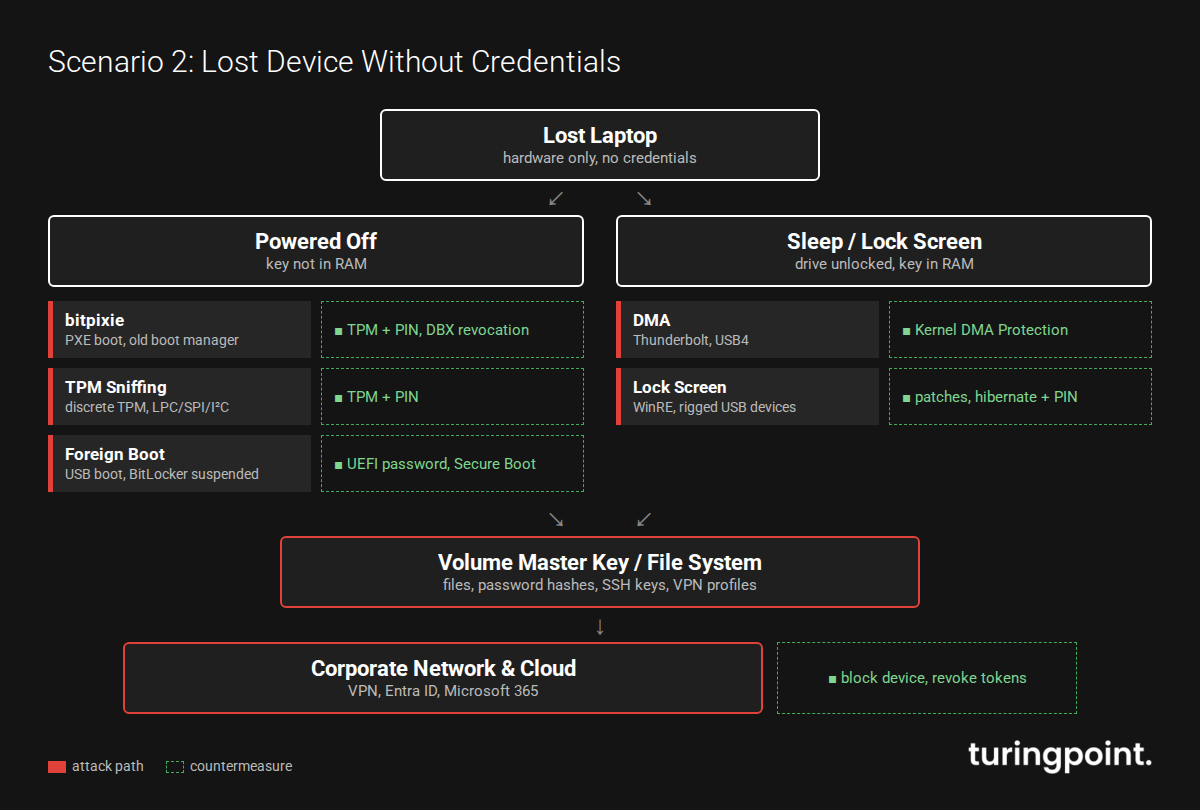
In practice we distinguish two states. A powered-off device is the best case for the defender, because the keys are not in memory. A device in sleep mode at the lock screen is far more interesting. The volume is already unlocked, the key sits in RAM, and every interface with access to memory becomes an attack vector.
Attack Path 1: BitLocker Without Pre-Boot Authentication
A great many corporate devices run BitLocker in TPM-only mode. It is convenient because users don't have to enter a PIN at startup. The TPM releases the key as soon as the boot chain measurements match. So the key lands in memory without any human involvement, and anyone who cleverly manipulates the boot chain or observes the key's path can grab it. Microsoft itself acknowledges in its documentation on BitLocker countermeasures that without pre-boot authentication, DMA and memory attacks remain possible.
The most prominent example of recent years is bitpixie (CVE-2023-21563). At 38C3, Thomas Lambertz showed how BitLocker in TPM-only mode can be bypassed without a screwdriver. Via a PXE network boot, the attacker loads an old, still-signed Windows Boot Manager that fails to wipe the Volume Master Key from memory during a soft reboot. A subsequently booted Linux reads the key out. This works even on fully patched systems as long as Secure Boot still trusts the old boot manager. The actual fix is the move to the Windows UEFI CA 2023 certificate plus the DBX update (KB5025885), which many fleets have not yet completed.
This matters right now, because the Windows Production PCA 2011 certificate that signed the old boot managers expires on October 19, 2026. Expiry alone does not strip trust from the old boot managers, though, and devices keep booting normally. The gap is only closed by the DBX revocation.
Devices with a discrete TPM chip add TPM sniffing to the list. Communication between CPU and TPM usually travels unencrypted over the LPC, SPI or I²C bus. Firmware TPMs integrated into the CPU are not affected. A cheap logic analyzer is enough to capture the key during boot. It requires an open chassis and, depending on the mainboard, soldering skills or suitable probe clips, but no knowledge beyond publicly available guides.
Attack Path 2: Sleeping Devices and DMA
If the notebook is closed and in standby, the volume is open. Here we check whether external interfaces allow direct memory access. PCIe hot plug ports such as Thunderbolt and USB4 are the classic route. Modern Windows devices ship with Kernel DMA Protection, an effective IOMMU-based safeguard. Peripherals without DMA-remapping-capable drivers are blocked while the screen is locked. Whether it is actually active depends on firmware support and the virtualization option (VT-d) in UEFI, and it only kicks in once the operating system has loaded. We check this on the actual device.
Then there are attacks on the lock screen and the recovery environment (WinRE), as the BitLocker bypass CVE-2024-20666 demonstrated, as well as rigged USB devices posing as a keyboard or network adapter. With memory unlocked, a single such gap can be enough for full access.
Attack Path 3: Firmware, Boot Order and Local Configuration
Often there is simply no BIOS/UEFI password, USB boot is allowed, or Secure Boot is disabled or in setup mode. Booting a foreign system alone isn't enough while BitLocker is intact, because the TPM won't release the key when the boot chain changes. But if BitLocker is still suspended after a firmware or system update, the key is available in the clear on the volume, and the data is open. Even without decryption, firmware version, Secure Boot databases and boot configuration can be read out. They show which known bypasses are even viable on this device.
Once the file system is accessible, we look for anything that can be reused. The usual yield includes local copies of OneDrive and SharePoint content, scripts containing passwords, SSH keys, VPN profiles, cached domain credentials (crackable offline if passwords are weak) and the hashes of local accounts. Browser passwords and cookies, by contrast, are bound to the user's password via DPAPI and can't easily be read offline.
From the Laptop Into the Corporate Network
On devices with a TPM, the keys behind the Primary Refresh Token, and often the device certificate, are bound to the TPM and cannot simply be copied. But anyone who can run code on the device itself, for example after a DMA attack on the locked machine, may be able to use them right there. To Entra ID it is then a registered, compliant device, and the scenario turns into scenario 1. An Always On VPN with a device tunnel even connects before anyone signs in.
That is why we also look at the organization. How quickly is a loss reported, and who blocks the device in Intune and revokes certificates and sessions? If the device stays offline, the remote wipe never arrives either.
Then there is the question of whether the supervisory authority must be notified under Art. 33 GDPR, which should happen within 72 hours where feasible. Encryption plays a legal role here too, since Art. 34(3)(a) GDPR explicitly names it as a reason why notifying data subjects may not be required. That only applies if it is actually effective.
How a Lost Device Pentest Works
We test a device that matches your fleet's standard image and hardware exactly, plus a test account with the rights of a regular employee. For scenario 2 we test the device powered off and in sleep mode. Beforehand we agree on how invasive the test may be, for example whether the chassis may be opened and work done on the mainboard. The test typically covers:
- Scenario 1: sign-in with the test account, privilege escalation, cloud and AD access
- Test of the block and revocation process, measuring how long access keeps working after the report
- Scenario 2: analysis of firmware configuration, Secure Boot state and boot order
- Review of the BitLocker protector and known bypasses such as bitpixie
- DMA and interface tests on the locked device
- Hardware-level attacks such as TPM sniffing, where approved
- Analysis of extracted data and how far it reaches into network and cloud
The outcome is an assessment of your specific configuration, covering what an attacker reaches in half an hour and what they reach with more time and tools. Reference points for the assessment include module SYS.3.1 Laptops of the BSI IT-Grundschutz Compendium (2023 edition) and NIST SP 800-111 on storage encryption for end user devices.
The Most Effective Countermeasures
Against scenario 1, the main levers are Credential Guard, Windows LAPS, users without local admin rights and CAE-capable applications. In public, biometric sign-in beats the PIN, because a face can't be read over someone's shoulder.
Against scenario 2, pre-boot authentication is almost always the biggest lever. BitLocker with TPM plus PIN renders bitpixie, TPM sniffing and most boot chain attacks on a powered-off device ineffective. If you don't want it fleet-wide for usability reasons, enforce it at least for executives, admins and frequent travelers. Add the switch to the new Secure Boot certificate with revocation of old boot managers, a firmware password, disabled booting from external media and Kernel DMA Protection that is verifiably active. For mobile devices, hibernate is preferable to standby. It only helps in combination with a PIN, though, because without pre-boot authentication the TPM releases the key automatically again on resume.
Organizationally, you need a simple way to report losses, a documented procedure for blocking device, account and tokens, and regular checks that the hardening really applies to every device.
Conclusion
If the attacker has the credentials, what matters most is how quickly access gets blocked. Without credentials, it comes down to BitLocker and firmware configuration details nobody sees day to day, and bitpixie showed that "BitLocker is on" isn't enough. A lost device pentest checks on the real device whether a lost laptop remains an annoying hardware loss or becomes an entry point into the corporate network. If you want to know how your client fleet fares in both scenarios, talk to us about a penetration test.